

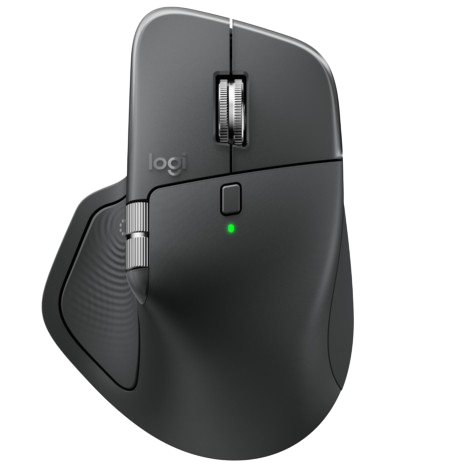
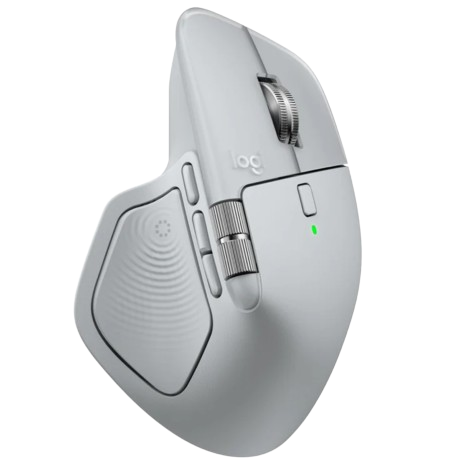
Logitech MX Master 4 Wireless

Prix habituel
33,990 DA
Prix soldé
33,990 DA
Prix habituel
0 DA
Color: Graphite

Immerse yourself with the Haptic Sense Panel

with customizable* haptic feedback on specific actions, shortcuts, notifications enhancing productivity. Feel the snap of images snapping onto grids, notifications, desktop switching, slider adjustments and more. Customize feedback, intensity, and add plugins for 3rd party apps with Logi Options+ for a more personalized workflow.

Save up to 33% of your time with Actions Ring shortcuts*

Keep your workflow flowing with the Actions Ring, bringing your favorite tools, shortcuts, and actions right to your cursor. Skip all the menu searching and reduce your mouse movements by up to 63%*. Personalize shortcuts and download plugins for third-party apps with Logi Options+ to make the Actions Ring work for you.

Feel precision with native haptics on Windows 11

MX Master 4 brings native integration with Advanced Haptics on Windows 11.* Feel precision when managing windows, aligning in Powerpoint and other compatible apps. Control the native Windows haptics from the Windows OS settings. Update the firmware of your MX Master 4 from the Options+ device settings page.

Scroll 1,000 lines per second

Flow through tasks with the MagSpeed scroll wheel, Logitech’s fastest and most precise scrolling experience*. Switch effortlessly between ratchet mode—87% more precise** —and hyper-fast mode, 90% faster*, zipping through 1,000 lines per second. The machined steel wheel is smooth, quiet, and weighted for perfect glide control.

Track on any surface, even glass* with the 8K DPI sensor

Track with precision using an 8,000 DPI sensor that works on virtually any surface—even glass*. Logitech’s most accurate sensor ever is 5x more precise than a basic mouse**, delivering responsive, pixel-perfect control for large screens and focused workflows.

Experience 2 x more powerful connectivity*

Powered by an advanced radio chip, improved antenna placement, and a next-gen USB-C dongle, MX Master 4 keeps you connected faster, stronger, and more reliably. Say goodbye to interruptions and hello to seamless workflows. (compared to mx master 3s)

More comfort. Deeper focus.

MX Master 4 is designed to keep you comfortable and in the flow for hours. It’s optimized tilt angle keep your arms in a more natural posture and it’s ideally positioned buttons allow for quick and intuitive navigation. Even the scroll wheel follows the natural movement of the thumb for fluid and intuitive horizontal navigation.

Do more with Logi Options+

Take control of your MX Master 4 with Logi Options+*. Use the Flow feature to seamlessly share files, copy, and paste across devices and operating systems. Customize button shortcuts, tracking speed, and app-specific presets for editing, designing, or coding. Automate tasks with Smart Actions and expand functionality with plugins—making your tools work the way you do.

Work seamlessly across devices and OS

Connect with up to three devices and switch between them via Actions Ring or Easy-switch buttons on the mouse and transfer your files across devices seamlessly with Logi Options+*. Designed for versatility, MX Master 4 works seamlessly across major operating systems—Windows, macOS, Linux**, ChromeOS**, iPadOS**, and Android**—right out of the box. No tricky setup, just instant compatibility.
*Requires Logi Options+ app, available for Windows and macOS at app.logi.com., **Device basic functions will be supported without software for other systems than Windows and macOS

USB-C quick charging, long lasting

With USB-C quick charging (charging cable not included), MX Master 4 delivers up to 70 days of power on a full charge—and three hours of use from just a one-minute quick charge*. Need a recharge? Simply plug in and keep working,—no awkward pauses, just seamless productivity

High Performance. Engineered Responsibly.

We engineer our products for speed, precision, and high performance, all while considering sustainability as a key criterion throughout every stage of the product development process

Technical Specifications

Sensor & Tracking
  • Sensor Technology: Darkfield high precision
  • Nominal value: 1000
  • DPI (Minimal and maximal value): 200-8000 (can be set in increments of 50 DPI
Buttons
  • Number of Buttons: 8
  • Gesture button: Yes
Scroll Types
  • Scroll Wheel: Yes, MagSpeed wheel with smart shift
  • Horizontal scroll: Yes
  • Thumb wheel: Yes, same as horizontal scroll
Features
  • Customization app: Yes, Options + and basic support in Tune
  • Haptic feedback is supported for key Options+ features like Actions Ring, Smart Actions, Gestures and for the following plugins:: Adobe Photoshop, Adobe Lightroom Desktop, Zoom. Coming in October: Adobe Premiere Pro.
Battery
  • Battery type: Rechargeable 650 mAh
  • Battery life: 70 days
Connectivity
  • Connection Type: Wireless
  • Wireless technology: Bluetooth Low Energy
  • Wireless range: 33-ft (10 m)
  • Bluetooth Low Energy (BLE): 5.1